How to Build a CS2 Sticker Craft (2026)
November 8, 2026
A sticker craft is a gun and a handful of stickers that read as one idea. The gun is usually the easy part. What takes the time is choosing stickers that share a color, a team, or a story, then putting them where you will actually see them when the weapon is in your hands.
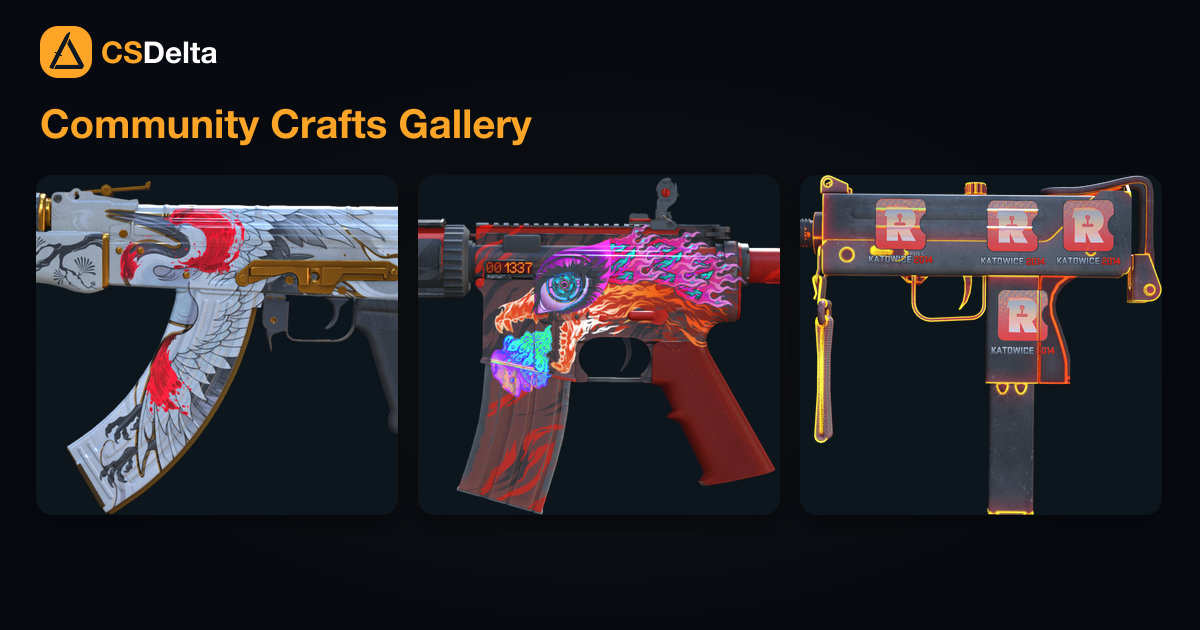
You can work that out before you buy anything. In the CS2 3D skin viewer you set the float and pattern, drop the stickers on, move and turn them, and try a scrape, with live prices on the skin and the stickers from the marketplace you already use on the site. When you want to see which of those ideas other people actually kept, the community sticker crafts gallery is a database of real builds, each with an inspect link and a recreate cost that moves with the market.
What you are sticking on
A sticker is its own item until you apply it. You can buy one on the Steam Community Market, in the CS2 store, or out of a capsule, and it just sits in your inventory until you decide where it goes. The thing you stick it to can be a skin you already own or a default gun. Knives do not take stickers, and gloves do not either.
Placing it
Open your inventory, right click the gun, and choose Apply sticker. Pick the sticker, then drag it, turn it, and use the zoom until it sits where you want. A gun can hold five. If two overlap, the one you applied later sits on top, so the order you apply them is part of the craft. You are not locked to the old preset slots anymore.
That position is final once you confirm. There is no button to nudge a sticker after it is on the gun. If it lands in the wrong place, the only fix is to remove that copy, which destroys it, and apply a new one. That is the reason to line the craft up in the viewer first, on the same float you plan to buy, and to look at it from the angle you see in a match. A sticker that looks loud on a market screenshot can vanish on a busy paint.
Scraping
Scraping wears a sticker down. It does not change the skin's own float. You can choose a scrape level while you are applying, or scrape later from the inventory, and either way the wear only goes up. A scraped sticker never goes back to fresh. Take it all the way and the sticker is removed, the slot is empty, and that copy is gone.
A few stickers hide a second design that only shows up once they are worn. Most of them just look older and rougher. If you are not sure you want the worn version, apply it clean, because you can always scrape more and you can never scrape less. Set the worn look in the viewer next to a clean copy, and only scrape in game once the two match.
One idea, then match the gun or get out of its way
A craft that holds together usually does one of two things. The stickers pick up something the gun already has, or they sit on a quiet gun so they can be the loud part. Either way, every sticker should belong to the same idea. Four favorite players from four teams and four years is a fun story about your inventory and a weak craft, because team stickers keep a color system across a year, and older paper does not sit on a gun the same way a new holo does.
If you follow a team, start there and pick a gun that already shares their colors, or one that fits how they play. When the player you want on the craft is an AWPer, an AWP in those colors with that player's stickers next to the org stickers is one thought. An AWP | Wildfire with ropz | Paris 2023 and FaZe Clan | Paris 2023 does exactly that. The orange gun, the org, and the AWPer are the same idea, so the craft does not have to explain itself.
If you do not care about a team, a plain gun is the easier canvas. AK-47 | Slate is the usual pick because the black leaves the stickers in front, and four Great Wave foil stickers turn that into a blue craft while four Nine holo stickers turn it into a bright, shifting one. Whiteout, Redline, and Guardian work the same way when you want the stickers to do the talking and the paint to stay out of the way.
Some guns are dull except for a single color, and the better move is to meet that color instead of covering it. AK-47 | Redline is a dark gun with a red stripe, and four Battle Scarred stickers pick up that red so the stripe feels like it was part of the paint. A bright skin can carry color too. AK-47 | Ice Coaled is already blue and green, so two green stickers toward the front and two blue stickers toward the back follow the paint instead of sitting on top of it. Cloud9 | Antwerp 2022 and Imperial Esports | Antwerp 2022 are one way to do that split with stickers from a single Major.
Start with a gun you would use anyway
There are more stickers than there are good reasons to buy a new skin. If the gun is already in your inventory, look for stickers that fit it. Buying a skin only so it can hold stickers is the expensive path, and it is easy to stop liking the base once the stickers are stuck and you cannot take them back without destroying them.
The community crafts gallery is the practical way to do that search. Filter by the gun you own, open a card, and you get the stickers, a 3D view, an inspect link, and a cost that follows the market. If nothing there fits the gun you have, design the placement in the viewer, buy the parts together, and apply them in game in the same order you stacked them. When the craft is on a real gun, paste the Steam inspect link into the gallery so the next person can find it. Knives, gloves, and guns with no stickers or charms are not accepted.
FAQ
Can you put stickers on a knife?
No. Stickers go on guns, including default weapons and skins you already own. Knives and gloves do not take them.
Can you undo a scrape?
No. The wear only goes up, and scraping all the way removes the sticker. Check the worn look in the 3D viewer before you do it in game.
Where do I preview a craft before I buy?
In the 3D skin viewer. Set the float and pattern, place the stickers, try the scrape, and read the live prices before you buy the parts.
Where is the craft database?
The community sticker crafts gallery. Open a build, inspect it in game, and see what it costs to put the same one together at current prices.